What is CAT6 Cable?
CAT6 (Category 6) is a type of twisted-pair Ethernet cable used for wired networking. It supports speeds up to 1 Gbps at distances up to 100 meters, and up to 10 Gbps at shorter distances (up to 55 meters). CAT6 cable contains 4 pairs of copper wires (8 wires total) and uses tighter twists compared to older cable types like CAT5e, which helps reduce interference.
CAT6 cables are commonly used to connect computers, switches, routers, and other network devices. You will find them in homes, offices, and data centers. The cable terminates into RJ-45 connectors on each end, which plug into standard Ethernet ports.
Tools You Will Need
Before you start, make sure you have the following tools and materials on hand:
- CAT6 cable (bulk roll)
- RJ-45 CAT6 connectors
- Crimping tool (RJ-45)
- Cable stripper
- Wire cutter / scissors
- Cable tester
- Keystone jacks (optional)
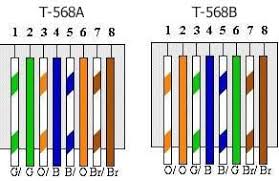
CAT Wire Color Diagram
CAT6 cables contain 4 twisted pairs of wires, each pair has a solid color and a striped color. The standard wiring schemes (T568A and T568B) specify the order of these wires when terminating the cable. Here is the color coding for both standards:
How to Terminate a CAT6 Cable (RJ-45)
Follow these steps to properly crimp an RJ-45 connector onto your CAT6 cable:
- Cut the cable to the length you need using your wire cutters.
- Strip the outer jacket about 1 inch from the end of the cable using your cable stripper. Be careful not to nick the inner wires.
- Remove the spline (the plastic cross separator inside CAT6 cable) by cutting it flush with the wires.
- Untwist the wire pairs and straighten them out as much as possible.
- Arrange the wires in the correct order for your chosen standard (T568A or T568B). Hold them flat and in order between your fingers.
- Trim the wires straight across so they are about 1/2 inch long and even.
- Insert the wires into the RJ-45 connector. Make sure each wire goes all the way to the end of its channel and the jacket reaches inside the connector slightly.
- Crimp the connector firmly using your crimping tool. This pushes the metal contacts into the wires and locks the jacket in place.
- Repeat on the other end of the cable.
- Test the cable using a cable tester to verify all 8 pins are wired correctly.
A small video guide uploaded by me for you to visually see how to terminate Ethernet wire.